Contacts, Emergency Contacts, and Medical IDs for Mobile Devices

I’ll tell you a little story that comes from my commercial support practice. One Monday morning, a woman noticed something strange: friends and coworkers were texting to ask why she'd sent them a document.
But she hadn't.
Instead, a malicious app on her Android phone had been granted permission to access her contacts. Once the phone was compromised, that address book became extraordinarily useful. It contained hundreds of names, phone numbers, and email addresses — friends, family members, coworkers, former colleagues, and businesses she'd dealt with over the years; the decades.
The attackers used that information to distribute convincing messages appearing to come from her. Recipients recognized her name, trusted the message, and some opened the malicious attachment or link. The malware now had an opportunity to spread again.
The original infection was bad enough, but her contact database made it worse, and this kind of crap happens to thousands of people every day.
I feel stories like these raise a question we rarely ask: Why are we carrying a database containing everyone we know everywhere we go?
For many people, the answer is simply, "Well, because that's how we've always used our phones. Plus, it’s easy and convenient!"
(Cringe) There it is again. Easy. Convenient.
Your Contacts Are a Liability
Your phone’s contact list isn’t just an address book. It’s a database of relationships, and for activists, advocates, journalists, organizers, and people working with vulnerable communities — even IT professionals — those relationships may be sensitive.
Names, phone numbers, email addresses, employers, and organizations can reveal who you know, who you work with, and potentially who belongs to a particular community or movement. If your phone is compromised by malware, that information could be harvested for phishing, impersonation, spam, or social engineering.
But malware isn’t the only concern. If your phone is lost, stolen, searched, or seized, a large contact database may expose people who never consented to being identified through your device. Protecting your contacts, then, isn’t only about protecting yourself. Data minimization protects the people around you. The safest sensitive contact information on a mobile device may be the information you never stored there in the first place.
Your Phone Doesn’t Need Everyone You Know
Most of us have been building the contact list on our phones for years. Friends. Coworkers. Clients. Doctors. Former coworkers. The plumber we called three years ago. Eventually, that little Contacts app becomes a surprisingly detailed database of the people in our lives.
I’ve always felt — from a privacy and digital security perspective — that practice is worth pushing back on, and I suggest a different approach: keep your phone's contact database small.
You don't necessarily need hundreds or thousands of people stored in Contacts. Social media platforms already maintain their own connections. Business users may have contacts in a CRM application. Email systems preserve addresses and correspondence. Other communication apps maintain their own contacts lists. Those can be leveraged in a safer way.
Reducing what's stored in your phone's Contacts database reduces the amount of information available there if something goes wrong. But there are a few people who absolutely should be easy to find.
Emergency Contacts
Emergency contacts are the people someone should call if you're injured, unconscious, or otherwise unable to communicate. These might include a spouse, partner, parent, adult child, close friend, caregiver, or another trusted person. Emergency contacts can be made accessible from your phone's Lock Screen without giving someone access to everything else on your device.
On an iPhone
Apple incorporates emergency contacts into Medical ID:
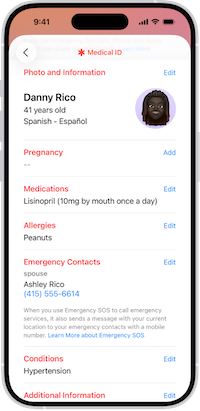
Open Health.
Tap your profile picture.
Tap Medical ID.
Tap Edit.
Under Emergency Contacts, tap Add Emergency Contact.
Select the appropriate person and relationship.
Turn on Show When Locked.
Tap Done.
Your emergency information can then be accessed from a locked iPhone by opening Emergency from the passcode screen and selecting Medical ID.
Medical ID: Information That Could Save Your Life
Your Lock Screen can also provide critical medical information without exposing the rest of your phone.
Consider including information a first responder might genuinely need: allergies, medications, important medical conditions, blood type, and emergency contacts. Don't turn Medical ID into your complete medical history. Include information that could matter when you cannot speak for yourself. On an iPhone, go to Health → Profile → Medical ID → Edit. Add the information you want available and enable Show When Locked. Apple also provides an option to share Medical ID information during an emergency call.
On Android
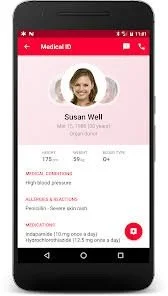
Android implementations can vary somewhat by manufacturer, but on supported Android devices Google's Safety/Personal Safety features provide similar capabilities:
Open the Safety app.
Tap Your info.
Select Medical information and enter the information you want available.
Select Emergency contacts → Add contact and choose your emergency contacts.
Select Emergency info access and enable Show when locked.
On supported Android phones, someone can access this information from the locked screen by swiping up, selecting Emergency, and then View emergency info.
Store Less. Expose What Matters.
Privacy doesn't always require complicated technology. Sometimes it means asking a simple question: Does this information really need to be on this device?
Consider trimming your Contacts database dramatically. Keep your broader professional and social networks in systems designed to manage them. Then configure your phone so the handful of people — and the small amount of medical information — that could matter in an emergency are available when they're actually needed.
That's data minimization with a purpose: less information for someone to exploit, but the right information available when it could save your life.
R
